
Token-2022 Data
Some tokens carry extra rules called extensions. These appear under 📃 Extension Data, just below Token Data. Tap an extension name for its explainer.
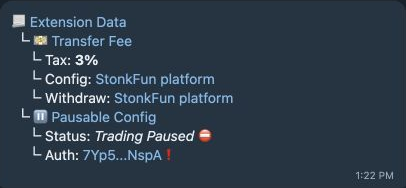
Fields you can see
Section titled “Fields you can see”| Extension | Fields and possible states |
|---|---|
| 💵 Transfer Fee | Tax: fee percentage on token transfers—including buys, sells, and wallet-to-wallet transfers—or Unknown. ⚠️ appears at 10% or more. Config: who can change the fee. Withdraw: who can collect withheld fees. |
| 💅 Permanent Delegate | Delegate: authority that can transfer or burn tokens in token accounts. A major red flag: it can move or destroy your tokens without your approval. |
| ⚖️ Interest Bearing | Rate, Config authority, and Updated date. Adjusts the displayed token amount; it does not affect the token balance on chain. |
| 🪝 Transfer Hook | Auth and Program links. Extra program logic runs during transfers. Potentially a major red flag: inspect what that program can do. |
| ⏸️ Pausable Config | Trading Active ✅ or Trading Paused ⛔️, plus the authority. A pause can block transfers, minting, and burning. |
| 🧊 Default Account State | New accounts: Not Frozen ✅, Frozen ❄️, or Unknown ❓. |
| 📐 Scaled UI Amount | Auth and Multiplier. Changes the displayed amount without changing the underlying raw balance. |
Authority alternatives
Section titled “Authority alternatives”Revoked 💚 means removed; a linked address opens Solscan; ? means unknown. A matching platform-controlled fee authority can display StonkFun platform instead of its shortened address. That attribution does not mean the fee is fixed.
Other states
Section titled “Other states”- Unsupported: … — an extension was detected but has no decoded detail view.
- Some extension details are unavailable — one or more fields could not be decoded.
- Confidential Transfer / Auth can appear in saved reports, but is not currently populated by new scans.
Not every Token-2022 token has a visible Extension Data block. Alerts for extension risks appear in Warnings & Alerts.