
Report Keyboard
The buttons beneath the report open more data or act on the report message.

| Button | What it does |
|---|---|
| 📊 View Detailed Report | Opens the section menu below. |
| 👀 Track Dev | Opens Watcher for the report’s deployer address. From a group, opens Trenchy in private chat. |
| 🔄 Refresh | Requests an updated report view. |
| 🗑 Close | Removes the report message. It does not sell tokens or stop watching a deployer. |
Inside View Detailed Report
Section titled “Inside View Detailed Report”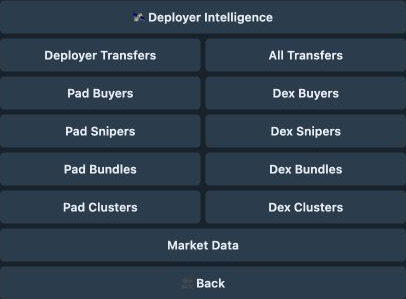
| Option | Opens |
|---|---|
| Deployer Intelligence | Creator launch history, median ATH, and performance. |
| Deployer Transfers / All Transfers | Creator transfer trace or traces for investigated wallets. |
| Pad Buyers / Dex Buyers | First-buyer lists for the launchpad or pool event. |
| Pad Snipers / Dex Snipers | Sniper groups and wallet activity. |
| Pad Bundles / Dex Bundles | Bundle groups and wallet activity. |
| Pad Clusters / Dex Clusters | Coordinated buying groups and wallet activity. |
| Market Data | Additional market and trading-period data. |
| 🔙 Back | Returns to the report. |
Arrows move through longer lists. Reports with limited history can omit Track Dev and history-dependent detail options.